A monday.com report in Google Sheets breaks in 3 ways. The data goes stale, someone renames a column on the board, or a column leaves the sync and everything to its right moves over. A sync fixes the first. This guide fixes the other 2 with one formula pattern.
We make Monday to Sheets, so the sheet layout below is ours. The formula idea works on any sheet that keeps a row of stable column IDs.
Short answer: sync the board into its own tab, build the report on a second tab, and point every formula at the column's monday.com ID in the hidden row 1, not at a column letter or a header name.
Why most monday.com reports in Sheets break
Most guides, Unito's included, have you match columns by the header name. That works until someone on the board renames "Budget" to "Budget (USD)". The header in your sheet follows the rename, and every formula that matched "Budget" now returns #N/A.
Column letters break a different way. Say your report sums I3:I because Budget sits in column I. Take Person out of the sync and every column after it moves one to the left. Budget is now in H, and I3:I sums Time tracking instead. No error shows up. The number is just wrong.
A pasted Excel export has both problems, plus a third: it's a snapshot. A status changed after you clicked export isn't in it.
The layout of a synced tab
Monday to Sheets writes every synced tab the same way:
- Row 1 is hidden and protected. A cell there holds the column's key: its monday.com type, a dot, then its column ID, like
status.status or numbers.numeric_mkq2b7xa. Renames don't touch it.
- Row 2 is the header people read. It follows renames on the board.
- Row 3 down holds the items, one per row.
The item name, the link and every column you picked follow. Columns you add yourself stay where you put them, and their cells follow their item when the rows are rewritten.
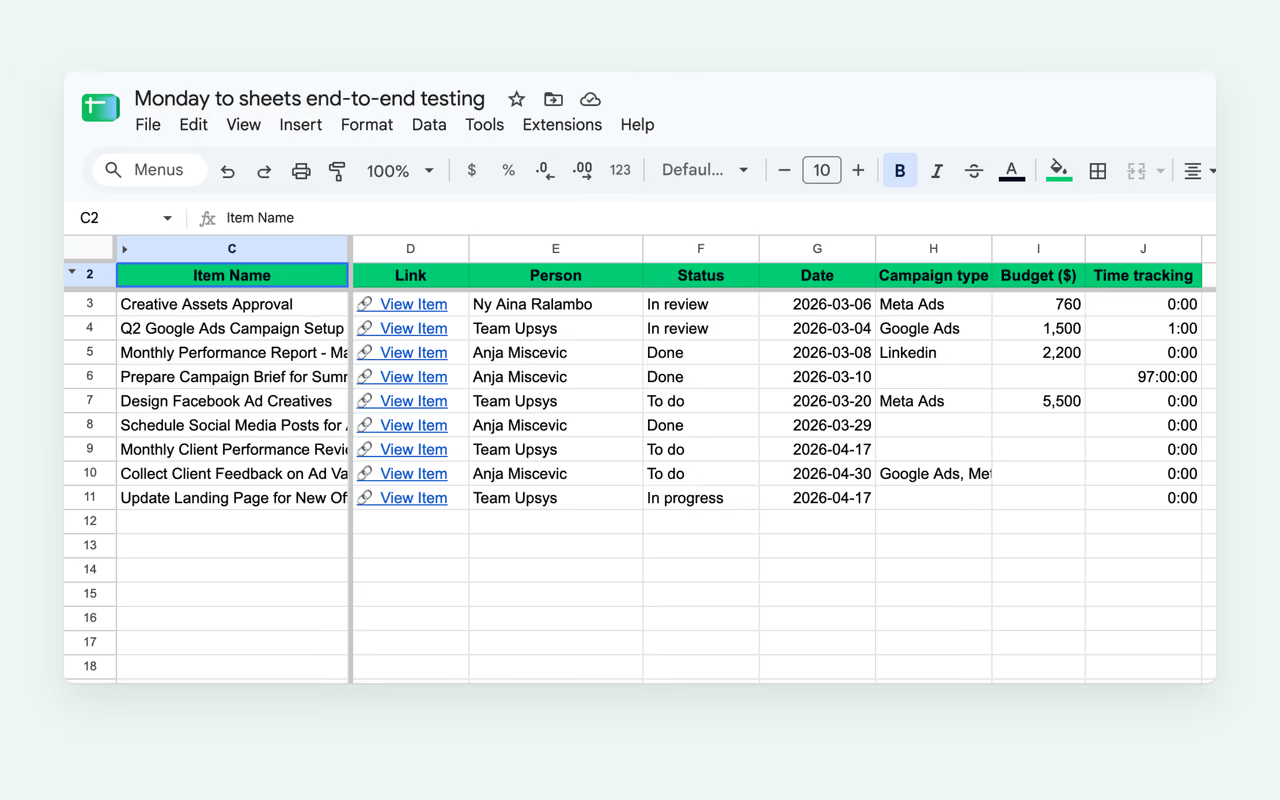
Step 1: sync the board and add a report tab
Sync the board into a tab. Here it's called Campaigns. Then add a second tab, Report, and keep all your formulas there. The sync rewrites Campaigns each time it runs. Keep the summary out of its way.
Step 2: read the keys
You need the key of each column you report on. In any empty cell on Report, type:
=TRANSPOSE(Campaigns!1:1)
That lists every key from the hidden row, top to bottom. Copy the ones you need and delete the formula.
Step 3: look the column up by its key
Here's the formula that holds up. It sums Budget for every item whose Status is Done:
=SUMIFS(
  INDEX(Campaigns!A3:ZZ, 0, MATCH("numbers.numeric_mkq2b7xa", Campaigns!1:1, 0)),
  INDEX(Campaigns!A3:ZZ, 0, MATCH("status.status", Campaigns!1:1, 0)), "Done"
)
MATCH finds the key in row 1 and returns its position. INDEX with a row of 0 hands back that whole column from row 3 down. So the formula reads "the Budget column, wherever it sits today". A rename or a moved column doesn't change the answer.
Swap in your own keys and status labels. The same lookup slots into any function that takes a range.
Count items by status:
=COUNTIFS(INDEX(Campaigns!A3:ZZ, 0, MATCH("status.status", Campaigns!1:1, 0)), "Stuck")
List overdue items that aren't done:
=FILTER(
  INDEX(Campaigns!A3:ZZ, 0, MATCH("__monday_item_name", Campaigns!1:1, 0)),
  INDEX(Campaigns!A3:ZZ, 0, MATCH("date.date4", Campaigns!1:1, 0)) < TODAY(),
  INDEX(Campaigns!A3:ZZ, 0, MATCH("status.status", Campaigns!1:1, 0)) <> "Done",
  INDEX(Campaigns!A3:ZZ, 0, MATCH("__monday_item_name", Campaigns!1:1, 0)) <> ""
)
That last line matters. The range runs past the last item, and a blank date counts as earlier than today, so without it the list fills up with empty rows.
Step 4: make it shorter with a named function
Typing the INDEX and MATCH pair every time gets old. In Google Sheets, open Data, then Named functions, and add one called BOARDCOL with a single argument, key:
=INDEX(Campaigns!A3:ZZ, 0, MATCH(key, Campaigns!1:1, 0))
Now the Done budget reads like this:
=SUMIFS(BOARDCOL("numbers.numeric_mkq2b7xa"), BOARDCOL("status.status"), "Done")
The 3 ways to point a formula at a column
|
Column letter (I3:I) |
Header name (MATCH("Budget", 2:2, 0)) |
Key in row 1 (MATCH("numbers.…", 1:1, 0)) |
| Column renamed on the board |
Still works |
Breaks |
Still works |
| A column before it leaves sync |
Wrong column, no error |
Still works |
Still works |
| New column added to the sync |
Still works |
Still works |
Still works |
| Easy to read |
Yes |
Yes |
Less so, until you add BOARDCOL |
New columns land at the end of the tab. That's why the letter survives that row of the table.
Keep it current
The report is only as fresh as the tab under it. Manual sync is on every plan, starting at $9 a month for 3 boards. Pro runs the sync every 3 hours, and Business adds live sync, which updates the tab within seconds of a change on the board.
Pro also has a dashboard toggle. Turn it on and the sync adds a companion tab with item totals and a breakdown by a status or dropdown column. If that's all your report needs, you can skip the formulas.
If the report never has to leave monday.com, a monday.com dashboard does the job without a sheet. Sheets earns its place when you need to join the board with other data, share it with someone who isn't on your monday.com account, or chart it in Looker Studio.
How to sync monday.com to Google Sheets compares every way to get the data there, including the ones that aren't ours.
FAQ
Can I write formulas directly in the synced tab?
Yes, in a column you add yourself. Its cells follow their item when the sync rewrites the rows. A summary over the whole board belongs on its own tab, though, where nothing rewrites it.
Where do I find a column's ID in monday.com?
You don't have to go to monday.com for it. =TRANSPOSE(Campaigns!1:1) lists every key the sync wrote, with the column type in front of the ID.
What happens to my report if I delete a column on the board?
The column leaves the synced tab, and MATCH can't find its key. Formulas that used it show #N/A, which tells you which numbers to fix. A column-letter formula would have kept running on the wrong column instead.
Does this work with subitems?
Partly. Tick the Subitems column and each item's row shows its subitems' names in one read-only cell. They don't get rows of their own, so a sum over the tab counts each parent item once and never adds up subitem values.
